System administrator
System Maintenance
Scheduled Messages
Modify message
Create message
Scheduled messages
Message frequency options
Report selection
Email settings and troubleshooting
Send one-time message
T&A Web
UK & IRE time change instructions
T&A instructions for UK & IRE Time Change - October 2026
FES Instructions for UK & IRE Summer Time Change – October 2026
Dashboard Maintenance
Profile maintenance
Tab maintenance
Dashboard maintenance
Reports widget
Widget maintenance
Widget public URLs
Themes and Dashboard
Modifying and deleting a created Theme
Dashboard background
Creating a Theme
Custom login logos
Active Themes
Progress Indicator
Theme
Calendar Maintenance
Create calendar
Calendar profiles
Calendar data types page
Calendar maintenance
Creating a Calendar data type
Payslip Management
Kiosk
Kiosk details
Kiosk Configuration
Modify action
Kiosk site planner
Kiosk log
Modify Kiosk preferences
Preparing to install Kiosk
Terminal Site Planner
Deactivate and Reactivate the terminal webpage
Upgrade Terminal Firmware on 900 series or Access Control Unit via Web Service
Terminal upgrades
Terminal Site Planner
Poller preferences
Terminal Actions
Job Scheduler
Poller log
SAML Authentication
Licensing
Licensing upload errors
Upload T&A 8 License Instructions
Temporary Licence
Version Number Mismatch
Licensing
Request a Licence
Upload a Licence
Employee License
Messages Received
Enroller
Language Maintenance
Profile language
Importing and Exporting phrases
T&A Error phrases
Language maintenance
Culture maintenance
Advanced T&A Products Minimum IT Specifications
Configuring T&A for use with Microsoft Exchange Online
Support Knowledge Base
Clearing Anomalies - Start a New Period End
T&A 8 licence expiry and renewal
Adding and changing Users in WINTMS
Full Rights for New User
AutoID Badge designer
Delete a Finger Template
Need to Create a Report With a Date Prompt
T&A - European Working Time Directive Features
How to Change the Name Displayed on the Terminal
Client Install instructions
How to Download an Employee to the Terminals
Create New User
Changing the IP Address on a Mitrefinch 900 Series clock or Access control unit.
Employee in TMS but not in HR Manager
GPS clocking location from a mobile phone
Report That Shows if the Employee Has a Photo
Obtaining "500 internal server error" details
Spring Time Change - North America
How to Unlock a User
Support is Evolving
Data Assurance Module - Identifying and preventing the accidental deletion of data (TMS versions 8.33.0.0 and below)
.NET Framework 4.8 for T&A (version 8.35.0+)
'Use Only Once' Checkbox on Book Absence Screen
Changing the OT Threshold for OT Hours Calculation
Poller Keeps Going Down
Help with Australian ADP Export Coding
The Basics
Change Culture
Supervisor Basic Operations
Apply assumed clocks
Changes to hierarchical Security
Adding an additional day of credit
Invalid Login
T&A Entitlement Year End Procedure - Hosted by OneAdvanced
T&A Entitlement Year End Procedure - On premise
Logging in and out as an Employee
Apache Log4j CVE-2021-44228 "Log4Shell" vulnerability
Employee basic operations
TMS Apps
Logging in: the Help button
Adding a keyed absence
Logging in as a Supervisor
Error tGlb.GetPkg
General navigation
COVID 19 - How to manage staff working from home
SAML Authentication in TMS 7
Auto-Rostering - User Admin/Supervisors
Auto-Rostering overview
What data is synced from Time & Attendance to Auto-Rostering?
Schedule Setup
Manage Schedules
Solving a Schedule
Schedule Approval
Employee and User Management
Reporting
Employee Confirmations
Dashboards
Frequently asked questions - Auto-Rostering
T&A Data Share
Identity by OneAdvanced
Understanding Identity with T&A
Introduction to Identity
Identity by OneAdvanced - Platform guidance
Identity FAQs
Choose your authentication method (Federated vs Non-federated)
Managing multiple access needs
Employees without email addresses
What do I need to know?
Managing Identity
Leavers, rejoiners and deleting employees – the impact on Identity.
Setting up Non-Federated
Step 1 - Requesting your OneAdvanced Identity Service
Step 2 - Configuring your OneAdvanced Identity Organisation
Step 3 - Identity onboarding in Time and Attendance
Step 4 - Perform the Identity onboarding process
Step 5 - Inform employees and managers they can login using Identity
Step 6 - Employees and managers successfully login to Time and Attendance through Identity.
Setting up Federated
Federated Login with Time & Attendance - where Identity is already enabled for non-federated login
Step 1 - Requesting your OneAdvanced Identity Service (Federated)
Step 2 - Configuring your OneAdvanced Identity Organisation (Federated)
Step 2a - Setting up Federated using Entra, Google Identity or similar
Step 3 - Identity onboarding in Time and Attendance (Federated)
Step 4 - Perform the Identity onboarding process (Federated)
Step 5 - Inform employees and managers they can login using Identity (Federated)
Step 6 - Employees and managers successfully login to Time and Attendance through Identity (Federated)
SFTP Configuration
SFTP - Overview
SFTP - Prerequisites
SFTP - Generate your RSA 4096-bit SSH Key
SFTP - Connect with FileZilla
SFTP - Connect with WinSCP
SFTP - Upload and Download Files
SFTP - Troubleshooting
Onsite Report – OneAdvanced’s Liability Statement
RD Web User Guide: Duo Authentication Process Guide
Supervisor
The Supervisor View
Employee <undefined>
The Supervisor dashboard
Supervisor toolbar
Selecting Employees
Selection options
Employee and Group functions as a Supervisor
Change Supervisor password
Supervisor Functions
Clocking In and Out
Clocking in and out as a Supervisor
Clocking TAS
Location mapping for Clockings
SMS Clocking with Esendex
Make a T&A clocking
Absences
Employee Security
Invalid Credentials
Locking and unlocking an employee's account
Changing an Employee's PIN
Self service password reset
Password Expiry for Employees
Employee passwords
Timesheets
Payslip Management
Calendars
Restart Employee
Employee Maintenance
Availability
Supervisor Group Functions
On-site List
On-site list profile maintenance
Maintain On-site list
On-site list (Supervisor)
Maintain current watches
Modify On-site list
On-site system preferences
On-site list options
Diary
Group Planner
Rosters
Copy periods action
Create named roster action
Group planner preferences
Shift actions
Shift Lock To
Create personal rosters action
Group planner
Group Clock Card
Group Skills
Letters
Group Absence Profile
Find Cover
Job Planner
Group Messages
Hours Approval
Mass Change
Anomalies
Editing work records to correct Anomalies
Authorising in the Anomalies page
Review Anomalies as Supervisor
Group Badge List
Requests List
Adding Additional Payments
Budgeting
Reports
Reports overview
Supervisor Access to Reports
Default Reports
Report profiles
Creating a New Report
Adding additional columns to a Report
Report tasks
Reports employee selection
Bradford factor report
Running a Report
WinTMS User Guide
Employee
The Employee Dashboard
Employee Functions
Requests
Visitor Booking
On-site List
Employee Planner
Calendars
Clock Card
Clock card
Work record
Clockings Panel
Premium bands panel
Hours bands panel
Additional payments panel
Worked hours panel
Check Anomalies as Employee
Clocking T&A
Actual Lateness
Recent clockings
Employee Details
Timesheets
Reports
Payslips
Group Absence Profile
Availability
Availability
Availability details
Add Availability
Copy Availability
Delete availability
Availability errors
Absences
Employee Documents
Planned Shifts
Employee Messages
Skills
Employee Security
Auto-Rostering - Employees
Release Notes
Upgrading Time and Attendance
Release Reports
T&A 8.51.2.0 Release - 16th September 2026
T&A 8.51.1.0 Release - 4th August 2026
T&A 8.51.0.1 Release - 29th June 2026
T&A 8.51.0.0 Release - 26th May 2026
T&A 8.50.0.1 Patch Release - 11th May 2026
T&A 8.50.0.0 General Release - 21st April 2026
T&A 8.49.0.0 General Release - 20th March 2026
T&A 8.48.0.0 General Release - 27th February 2026
8.48 upgrade for P60 and Payroll End End - what you need to know
T&A 8.47.0.1 Patch Release - 20th February 2026
T&A 8.47.0.0 General Release - 9th January 2026
OneAdvanced mobile app
T&A 8.46.2.0 General Release - 27th November 2025
T&A 8.46.1.0 General Release - 30th October 2025
T&A 8.46.0.0 General Release - 15th October 2025
T&A 8.45.0.1 General Release - 21st August 2025
T&A 8.45 General Release - 9th July 2025
OneAdvanced People mobile app 1.3 release - 4th June 2025
T&A 8.44.0.0 General Release - 29th May 2025
OneAdvanced People mobile app launch - 20th March 2025
T&A 8.43.0.0 Controlled Release - 12th March 2025
T&A 8.42.0.0 General Release - 5th February 2025
T&A 8.41.2.0 General Release - 13th December 2024
T&A 8.41.1.0 General Release - 4th December 2024
T&A 8.41.0.0 General Release - 6th November 2024
T&A 8.39.0.1 Controlled Release - 17th July 2024
T&A 8.38.5.2 Controlled Release - 1st May 2024
T&A 8.39.0.0 Controlled Release - 19th June 2024
T&A 8.38.5.1 General Release - 16th February 2024
T&A 8.38.5.0 Controlled Release - 29th November 2023
T&A 8.38.4.1 Controlled Release - 2nd November 2023
T&A 8.38.4.0 Controlled Release - 1st September 2023
T&A 8.38.3.0 Controlled Release - 27th July 2023
T&A 8.38.2.0 Controlled Release - 9th June 2023
T&A 8.38.1.0 Controlled Release - 2nd May 2023
T&A 8.38.0.0 Controlled Release - 20th March 2023
T&A 8.37.4.2 General Release - 17th February 2023
T&A 8.37.4.0 Controlled Release - 20th January 2023
T&A 8.37.3.0 Controlled Release - 2nd December 2022
T&A 8.37.2.0 Controlled Release - 21st October 2022
T&A 8.37.1.0 Controlled Release - 1st September 2022
T&A 8.37.0.0 Controlled Release - 22nd July 2022
T&A 8.37.0.1 General Release - 23rd August 2022
T&A 8.36.10 Controlled Release - 9th June 2022
T&A 8.36.9.0 Controlled Release - 28th April 2022
T&A 8.36.8.1 General Release - 28th March 2022
T&A 8.36.7.1 General Release - 17th February 2022
T&A 8.36.7.0 General Release - 3rd February 2022
T&A 8.36.6.0 General Release - 16th December 2021
Got an idea?
OneAdvanced Mobile App
- All categories
- Release Notes
- Release Reports
- T&A 8.48.0.0 General Release - 27th February 2026
T&A 8.48.0.0 General Release - 27th February 2026

We are pleased to announce the latest patch release of Time and Attendance: Version 8.48.0.0 released 27th February 2026
Below you will find details of the changes included in this release.
New P60 html templates for Tax Year 2025/26
What have we done?
We have update the P60 html template to reflect the new HMRC fields added for Tax year 2025/26.
Why have we done this?
To ensure we meet HMRC guidance.
How will you benefit?
Users will be able to see the correct P60 template for Tax Year 2025/26 with the newly added HMRC fields for Statutory Neonatal Care.
Details of the change.
Updated P60 html template:
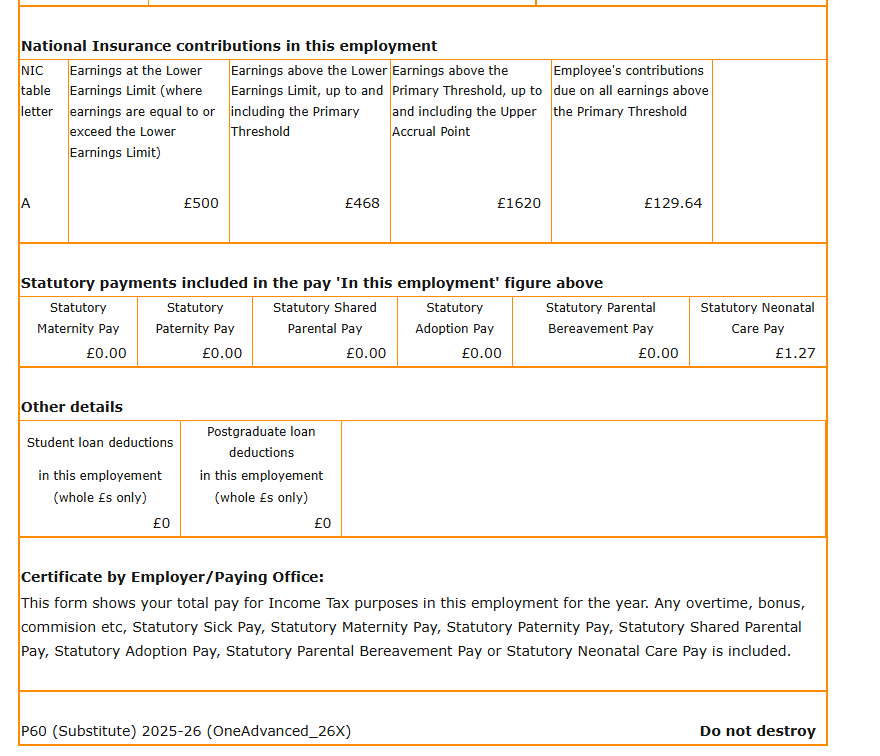
Further deatils regarding the P60 change, upgrading Time & Attendance and what it means to you can be found here.
Auto Rostering Capabilities available in One Advanced App
What have we done?
We have added Auto Rostering functionality to the OneAdvanced App for Job Offers and Shift Swaps.
Why have we done this?
To bring together a common user experience and wider product offering by having one mobile app that surfaces all OneAdvanced Products (as they become available) underpinned by our Platform.
How will you benefit?
The new OneAdvanced App is powered by our Platform, providing scalability, security and connectedness.
Details of the change.
The OneAdvanced App now includes key features for offering and accepting jobs. To find out more about the features available in the Mobile app click here, further details about the solution can also be found in our Factsheet here
CDC information removed from Data Share after rebuilding tables.
What have we done?
Rebuilding tables as part of a SYSGEN or DBDEF process removed the CDC permissions on a table.
Why have we done this?
We have updated the process to ensure that the CDC permissions are retained during a rebuild automatically, without manual intervention.
How will you benefit?
We have updated the process to ensure users will be able to continue to use their Data Share after a rebuild has been run.
Details of the change.
We have changed the upgrade/rebuild process so that the CDC script is run as part of the process. This ensures the user will be able to continue to use their Data Share after a rebuild has been run.
Exchange online emails for Windows T&A.
What have we done?
We have made improvements to the error handling for exchange online emails when generated through Windows T&A.
Why have we done this?
As customers adopt exchange online its important that any errors generated when sending emails are captured.
How will you benefit?
Improvements to error handling will provide the user with a greater understanding of any errors should they occur.
Details of the change.
We have made improvements to the error handling for exchange online emails for Windows T&A.
One Advanced AI.
What have we done?
We have changed the way that the OneAdvanced AI opens when selected.
Why have we done this?
Currently, when a user clicks on the OneAdvanced AI within the T&A application, the AI opens in the same browser tab.
How will you benefit?
This may disrupt the user’s current workflow and will require them to navigate back to continue their task.
Details of the change.
For subscribed users, OneAdvanced AI will open in a new browser tab while keeping the existing T&A workflow/task available.
Auto Rostering Enhancements
What have we done?
We have listened to customer feedback and made a number of enhancements to Auto Rostering.
Why have we done this?
To improve the user experience.
How will you benefit?
We have improved and streamlined some of the Auto Rostering processes improving the overall customer experience.
Details of the change.
A number of change have been made around Auto Rostering and a summary of these changes can be found in the table below:
Reference | Issue | Resolution notes |
TA-12893 | Constraints Active - Clicking View Jobs Details causes a 500 error. | Job details are now being successfully displayed. |
TA-12895 | Inserting a template into a Project causes an error. | Templates are now inserted successfully and immediately visible to the user. |
TA-12911 | Unable to delete unwanted schedules. | The system now allows authorised users to delete old, unused, or test schedules. |
TA-13076 | Improve performance while unassigning employees from tasks. | Performance improvements have been made. |
TA-13081 | Improve performance for Login and dashboard redirect. | Performance improvements have been made. |
TA-13242 | Following Auto Rostering Provision on logging into Auto Rostering and navigating to the users list page, there was no error visible, although a 501 error was being caught in the console. | Code improvements have been made to prevent this error and ensure error are handled. |
TA-13277 | Improve performance for Publishing Schedules. | Performance improvements have been made. |
TA-13272 | Improve performance while opening Job details. | The Job Details page exhibited long load times during performance testing this function has now been optimised. |
TA-13274 | Improve performance for Add/Remove Constraints. | These functions have now been optimised. |
TA-13275 | Improve performance for loading Manage Schedule page. | This function has now been optimised. |
TA-13386 | UI Improvement - Add a 'Select All' option for employees against the job offer page. | A Select All button has been added to the Job offer page allowing you to select all employees to send the Job offer to. |
TA-13387 | Global Job Offer option. | We have introduced a global 'Offer All Jobs' function that when triggered, will automatically sends job offers for every unfilled job to the relevant eligible employees (based on skills, qualifications, and availability rules already used by Auto Rostering). |
TA-13426 | Auto Solver Performance improvements. | This function has now been optimised. |
TA-13493 | Auto Solve button styling has been updated. | This has been updated to reflect consistency across products. |
TA-13495 | Update Cancel button to Close after template initiation. | In the Auto Rostering Insert Template flow, the Cancel button is currently shown throughout the process. Once the user saves changes and initiates the process, the action is now displayed as Close rather than Cancel. |
Want to gain access to the new features available in this Release?
To start using new features and functionality for Auto Rostering, the OneAdvanced App, AI and Data Share, the following requirements must be met:
- Identity: You must have Identity enabled within your organisation, providing secure access via single sign-on (SSO) and multi-factor authentication (MFA). Supporting guidance can be found here.
- Cloud hosting: Available to everyone on our cloud-based solution and have accepted our new Terms & Conditions.
For on-premise customers you will find our guide and instructions on how to upgrade your installation of Time and Attendance here.
